A mid-size SOC loses ~$182K/year to manual detection overhead. Rules break silently. Coverage gaps persist for weeks. I designed AutoDEX — Elastic's agentic detection system — to fix this: autonomous rule repair, noise tuning, and coverage gap closure, within analyst-defined scope.
Week one beta: 91% approval rate · 34 autonomous actions · 340 FP alerts/week → 2 · Shift orientation: 20–30 min → under 5.
The central design problem was trust — how much can an engineer trust a system they didn't build? Every decision answered that question.
02 My Role
Lead Solo Designer - Lead Researcher
Defining UX success metrics to ground the work in measurable outcomes
Running two rounds of user research with 20+ analysts from enterprise accounts
Wireframing and validating with internal stakeholders before moving to high fidelity
Building and testing agentic prototypes directly in Cursor
Iterating on the UX based on usability findings and analytics
Producing the engineering handover documentation using Claude Code
Analyst journey map — emotional friction across the detection engineering lifecycle · Composite from 20+ interviews
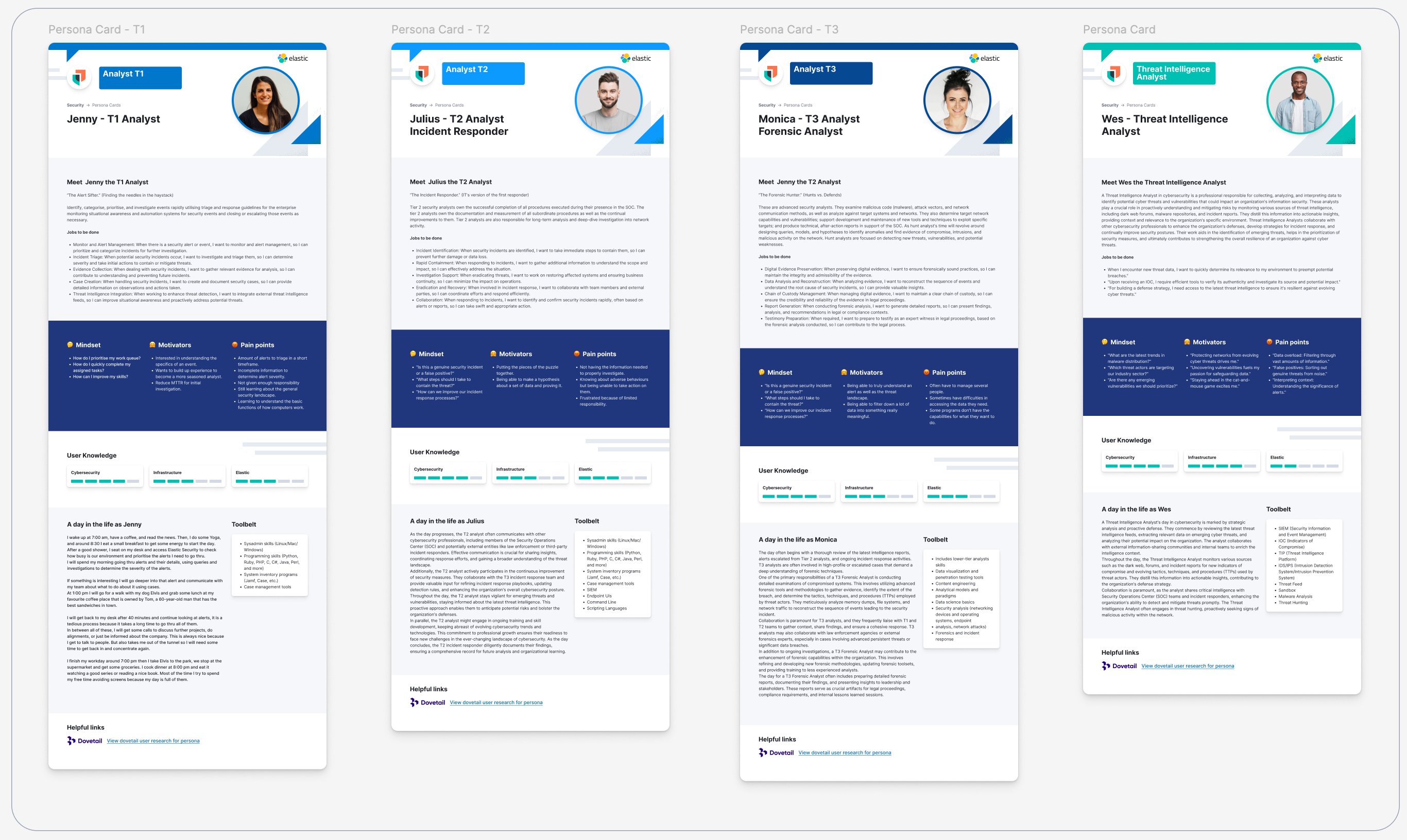
25+ interviews → Figma Persona Cards, used company-wide at Elastic. Every design decision anchored to a specific person, not an average user.
Figma-based Persona Cards — built from 25+ user interviews · Now used company-wide across the Elastic Security design team
Every team assumption plotted against confidence and criticality — before a single wireframe.
Assumption map — importance vs. confidence · Pink = risky assumptions requiring validation · Cyan = safe to build on
Most consequential disproved assumption: analysts want intent, not process. This single finding changed the entire design language of the agentic layer.
Two research rounds with 20+ analysts from Elastic's largest enterprise accounts — discovery first, then prototype testing.
20+
Security analysts interviewed across discovery and prototype testing rounds
2
Research rounds — discovery first, then prototype validation
ENT
Participants from Elastic's largest, most complex enterprise accounts only
I spend the first hour of every shift just figuring out what's broken. By the time I start doing real work, half the day feels wasted.
Senior SOC Analyst · Financial Services
The rules are there — I know they exist. I just can't tell which ones apply to my environment. It always takes longer than it should.
Detection Engineer · Enterprise Healthcare
When I install a rule, I'm never fully confident it will fire correctly. There's always background anxiety until it proves itself.
Threat Intelligence Lead · Technology
If something could tell me — here's your gap, here's the fix, I just need to approve it — I'd approve it. That's the relationship I want.
SOC Manager · Government
VisibilityWhen I open the dashboard, I want to see what needs attention, prioritised by impact — a smart approval queue ordered by blast radius, not arrival time. The highest-risk pending actions always at the top.
TrustWhen AutoDEX acts, I want to understand the reasoning behind every action — not just what it did or is proposing, but why. Full diagnosis available, concise intent signal by default.
ControlWhen I review a proposed action, I want to approve, edit, or dismiss it — and undo anything already applied — so every decision is mine and every action is auditable.
TrustWhen I want to understand AutoDEX's activity, I want a complete log of every autonomous action taken — clarity and understanding, not a black box.
Speed
Time to First Detection
Reduction in time from rule discovery to first active detection. Target: under 10 minutes for standard integrations.
Efficiency
Manual Steps per Rule
Decrease in manual configuration steps per rule activation. Target: 80% reduction.
Coverage
Proactive Rule Coverage
Increase in proactive coverage relative to environment profile — detection before the threat, not after.
Cognitive Load
Analyst Cognitive Effort
Reduction in perceived cognitive load during triage and setup, measured through qualitative usability sessions.
05 Design & Build
From wireframes to agentic execution
The 3UX approach
1UX · Kibana / EUI — The primary product surface where analysts monitor rule health, review approval queues, and manage their full detection estate.
2UX · Conversational Agent — Analysts ask questions in natural language and get AI reasoning, coverage maps, and one-click approval cards inline — no navigation required.
3UX · Claude Code / Cursor — AI inside the analyst's editor: preflight checks, MITRE mapping, and conflict detection as rules are written, without breaking flow.
Wireframing and stakeholder validation
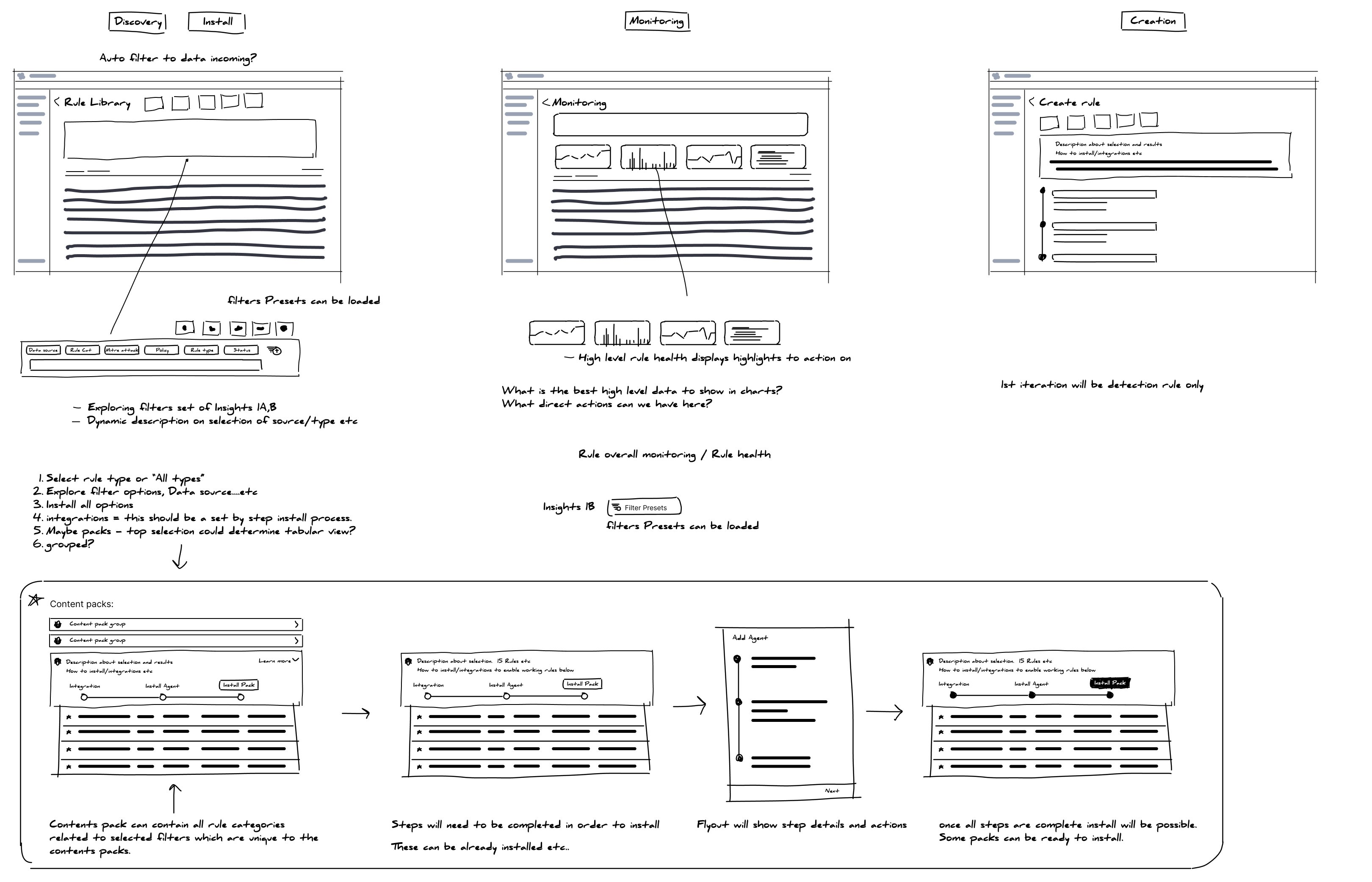
Design Jam first — rapid sketching with product, engineering, and security. Direction owned by everyone before formal design began.
Design Jam sketches — rapid stakeholder exploration of layout, trust model, and interaction patterns
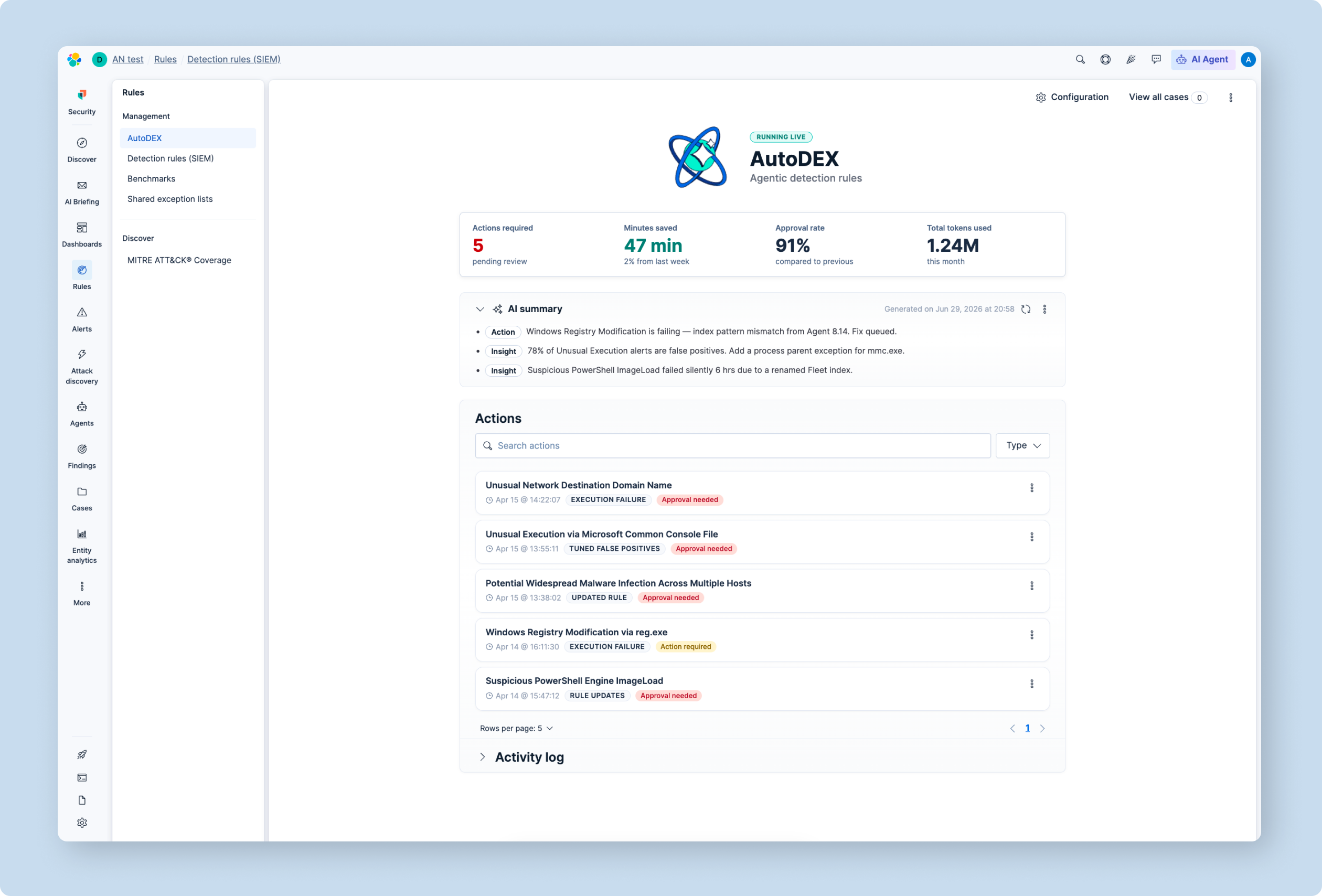
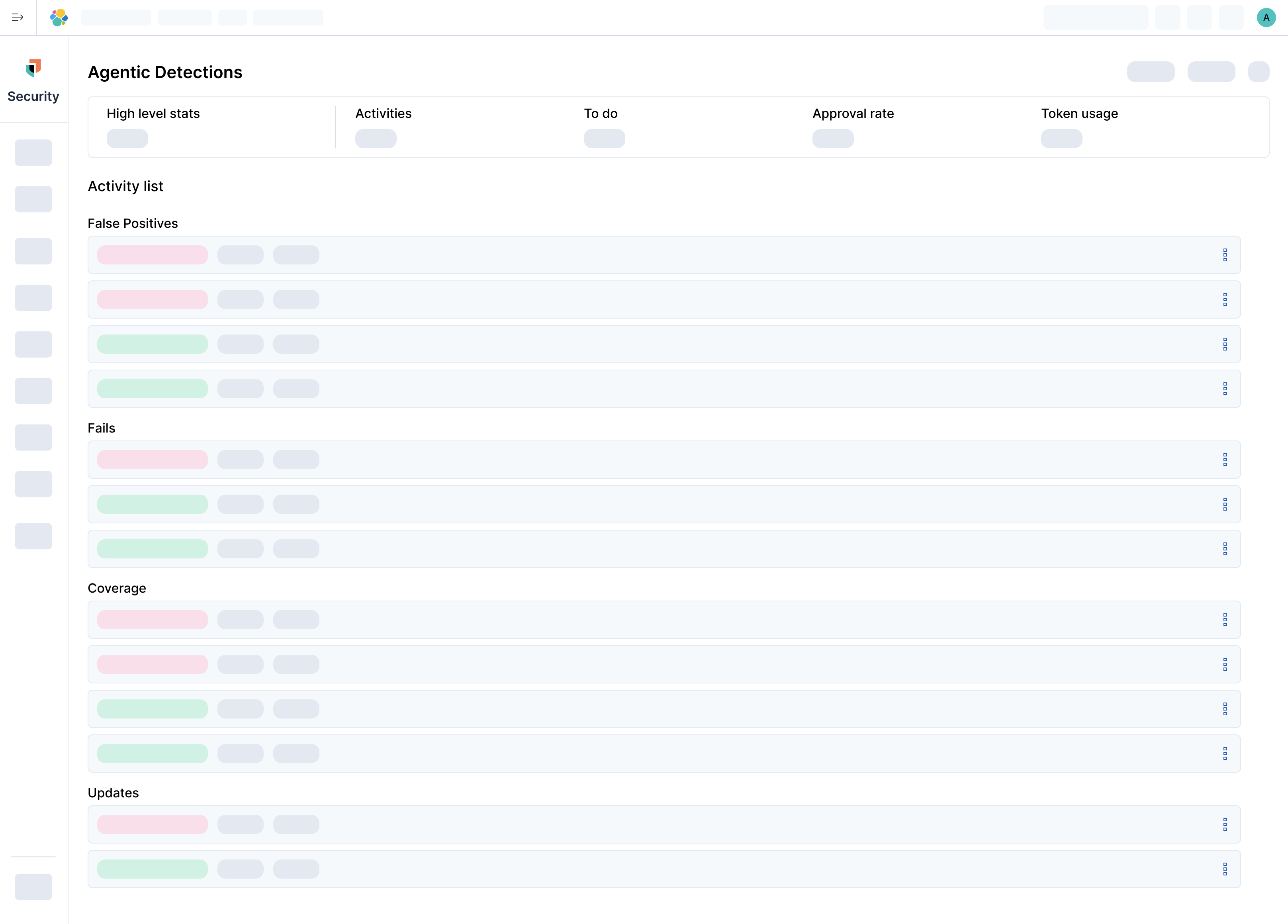
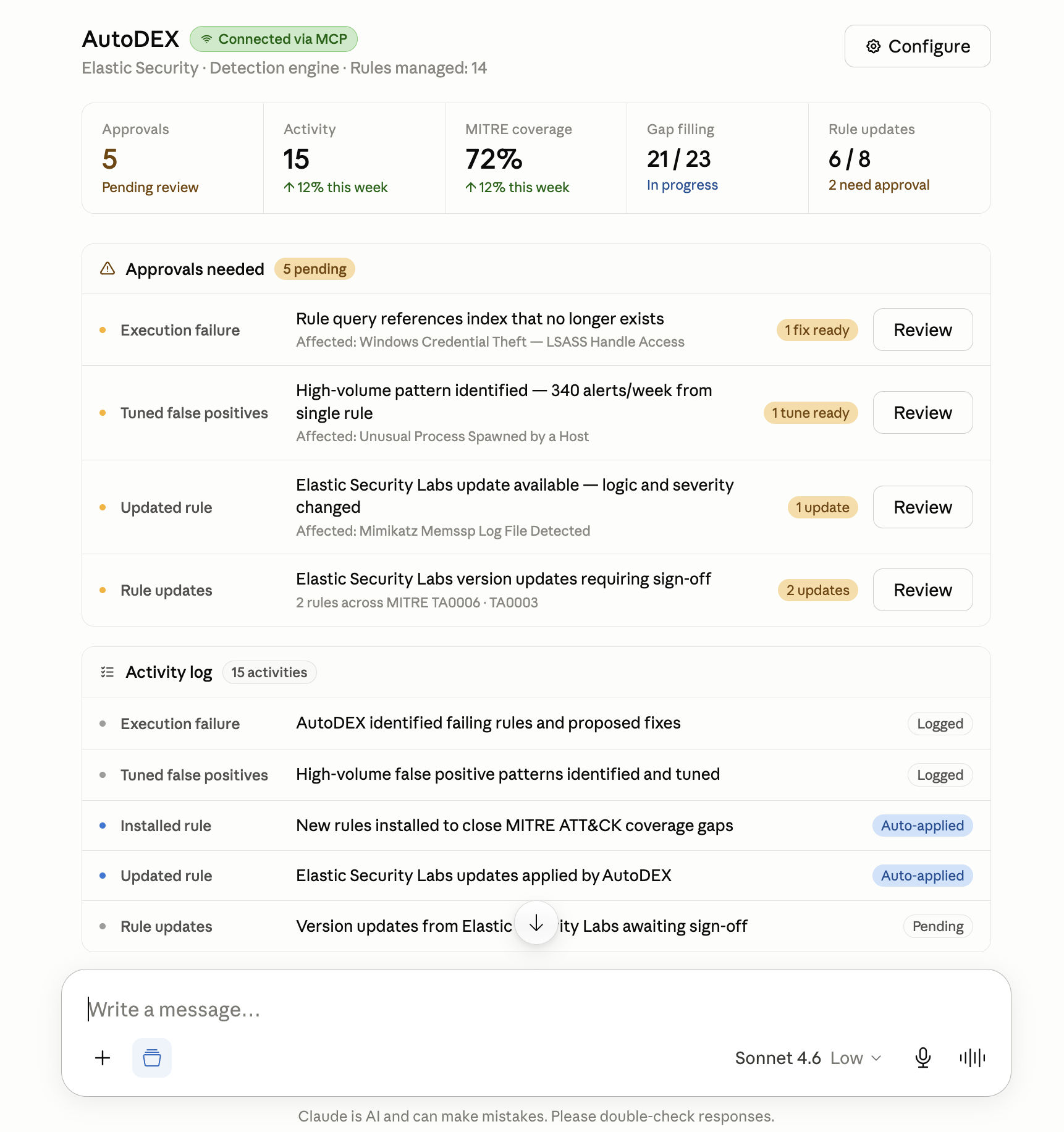
Wireframe 2 — AutoDEX: stat cards, approvals needed, and activity log in full page layout
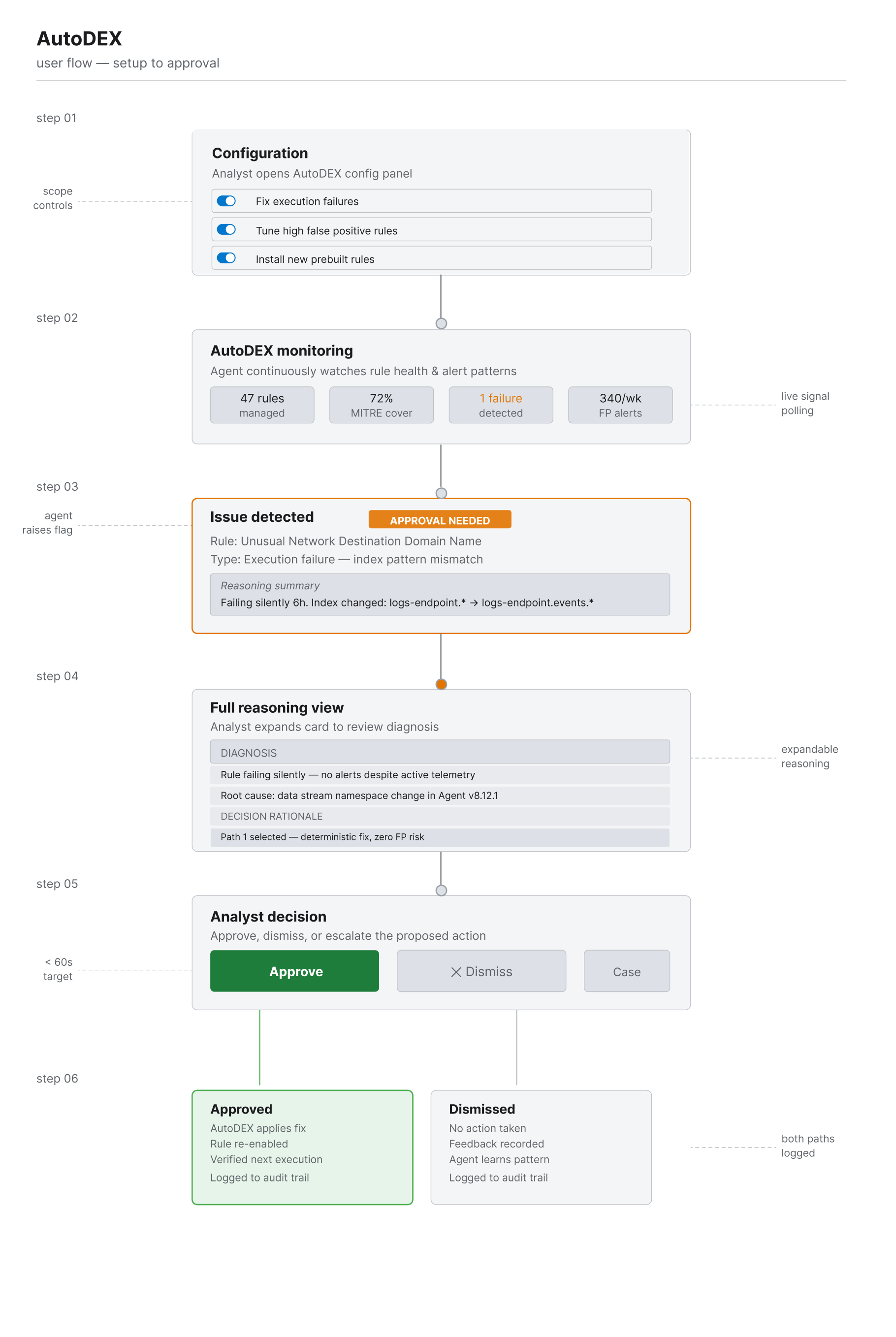
User flow — Setup to approval · Engineer scopes what AutoDEX can act on, AutoDEX monitors and flags issues, and the engineer reviews the reasoning before approving, dismissing, or escalating
Cursor prototyping and early design testing
Rather than advancing straight to high-fidelity Figma, I built functional prototypes directly in Cursor. This was deliberate — agentic behaviour can't be honestly tested with static mocks. The prototype needed to actually reason, respond, and make decisions.
Built working agent prototypes using Cursor with real detection rule scenarios
Tested reasoning flows, decision scope, and escalation triggers against live analyst tasks
Revealed that agents needed tighter context models and clearer decision boundaries than initially designed
Iterated on the confirmation checkpoint model — early versions required too many clicks before agents could act
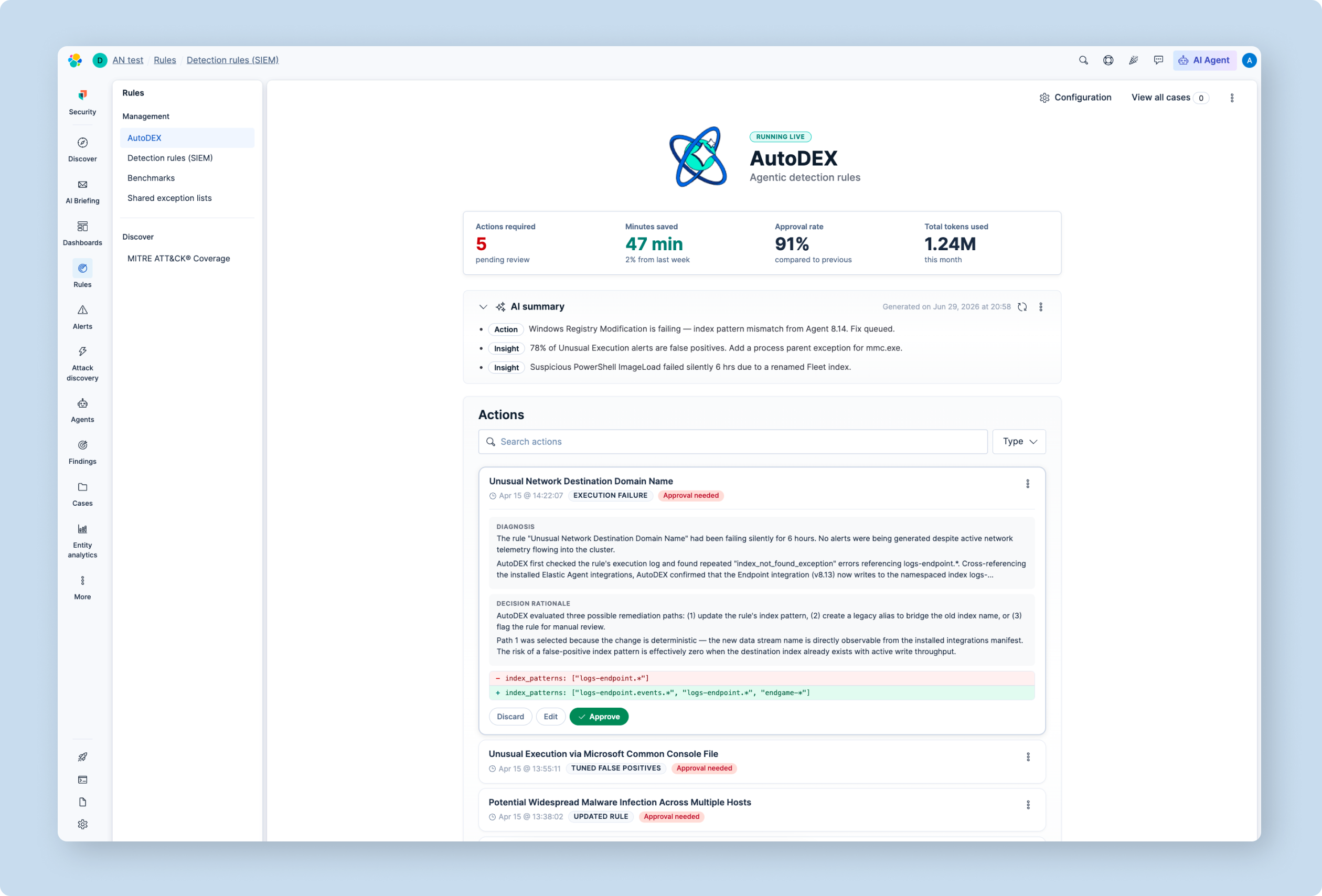
AutoDEX — Live dashboard walkthrough after Cursor prototype iteration
User testing the prototype — 20+ sessions
With a working prototype, I returned to the same analyst pool from the discovery round. These sessions were structured task-based tests: could analysts understand what the agent had done, approve or reject actions in under 60 seconds, and recover when something went wrong?
Task completion rates measured against the five UX success criteria defined in step 04
Time-on-task tracked for approval flows, gap identification, and shift-start orientation
Think-aloud protocol surfaced confusion around AI reasoning language — condensed and simplified post-testing
Net Promoter Score collected after each session to track perceived trust and confidence
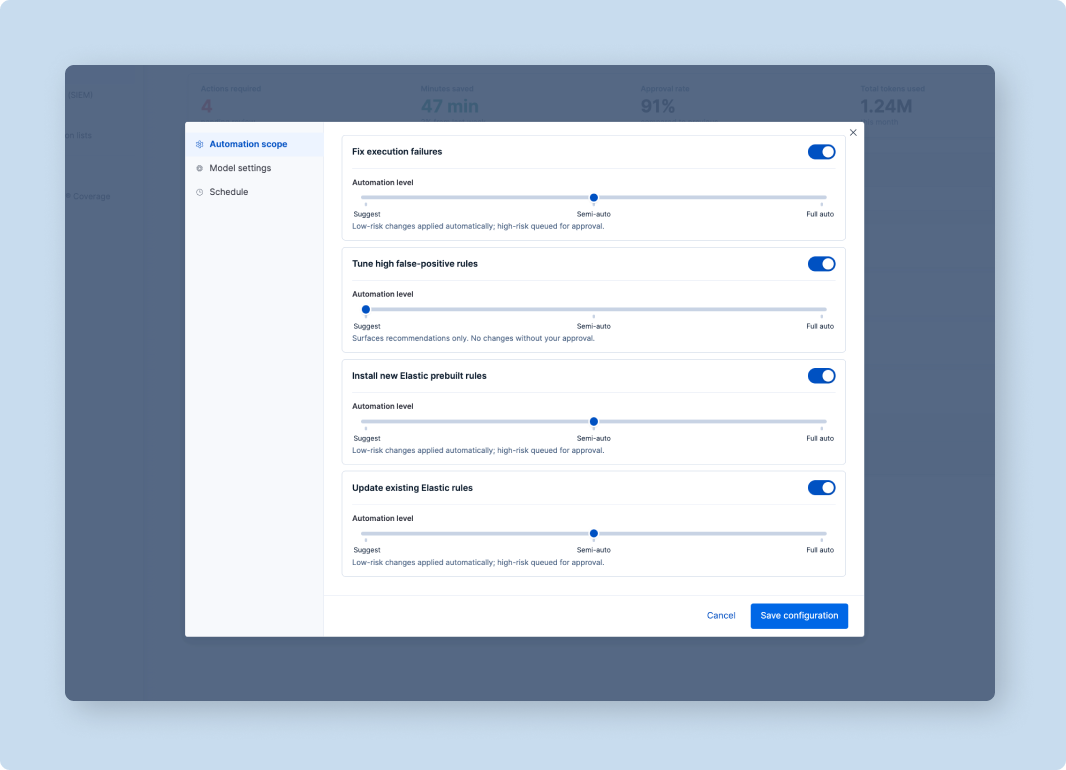
Testing revealed a consistent pattern: analysts trusted the agent's actions but wanted more control over its scope. The configuration panel — where analysts set automation levels per action type — emerged directly from this feedback and became one of the most positively received features in round two testing.
AutoDEX configuration panel — automation scope controls designed from user testing feedback
Engineering handover via Claude Code
Once the UX was stable and validated, I produced the engineering handover documentation using Claude Code. Rather than static Figma annotations, the handover was a living document — structured markdown with embedded component specs, interaction states, edge cases, and agent decision logic documented in plain language for the engineering team.
Component specifications with interaction states, error states, and loading behaviours
Agent decision logic documented as human-readable decision trees, not pseudocode
Edge case catalogue built from testing — covering failure modes, recovery flows, and manual override paths
Acceptance criteria written directly against the UX success criteria from step 04
Connecting the design system to the agent via MCP
I connected Elastic's EUI codebase directly to the agent via MCP, so it could read real component source, props, and types instead of inferring styling from a screenshot. The intent was full design-system compliance by default — in practice, it got there partway.
What the skill did: Gave the agent a live reference to EUI component patterns and interaction conventions, so generated approval cards and reasoning summaries could reuse real components instead of one-off markup.
Where it fell short: Output was inconsistent — in some cases the agent substituted custom-styled elements for the accessible EUI primitives (like EuiBadge/EuiToolTip for status indicators), which meant those instances lost the built-in keyboard focus handling and ARIA labelling the real components carry. That's a real accessibility gap in the MCP output, not just a cosmetic one.
What I did about it: De-prioritized fully resolving it given the release timeline, and flagged it as dedicated post-release work rather than shipping it silently broken.
What happened next: We came back to it after release and replaced the custom-styled substitutes with the actual EUI components (EuiBadge/EuiToolTip) they should have used from the start — restoring the keyboard focus handling and ARIA labelling that had been missing. It's also shaped how I approach this now: bake accessibility into the pattern library from day one rather than retrofitting it.
MCP skill connected to Elastic EUI — grounding AutoDEX outputs in the Elastic design system for consistency across the product
06 Results
Validated by research, measured in practice
The results below are drawn from two sources: structured user testing with the 20+ analyst cohort, and usage analytics from the AutoDEX beta rollout across three enterprise accounts. Together they confirm the system delivered on the five UX success criteria defined at the start.
1
Shift-start orientation time cut from 20–30 minutes to under 5
In user testing, analysts consistently reported being able to understand the state of their detection estate within the first few minutes of opening the dashboard. Usage analytics from the beta confirmed the pattern.
100% of test participants successfully completed shift-start orientation within the 5-minute target
Analysts described the approval queue as "immediately legible" — a significant shift from the previous experience
91%
Approval rate in beta
28 automated actions, 6 approved by analyst in first week
34
Actions in first week
28 auto · 6 analyst-approved · 0 dismissed
AutoDEX usage tab — 91% approval rate and 34 actions in the first week of beta
2
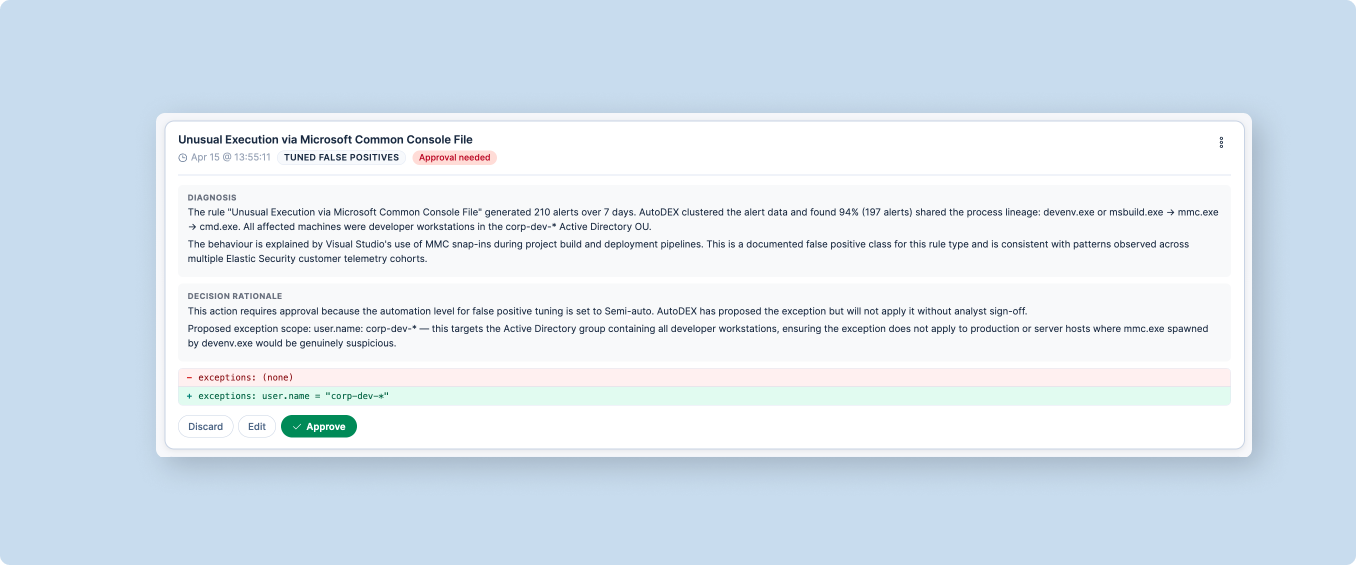
Alert noise: 340 FPs/week → 2. Approved in under 60 seconds
AutoDEX diagnosed the pattern, proposed a targeted exception. Analyst approved in under 60 seconds.
~99% reduction in false positive volume on the highest-noise rule
Analyst confirmed they understood the change before approving — the trust model worked exactly as designed
Estimated saving: ~$42,000/yr on this rule alone
AutoDEX reasoning view — full diagnosis and decision rationale surfaced for analyst review
3
Coverage gaps: from weeks to discover → real-time. Silent failures eliminated
Silent failures surfaced before they compounded. Coverage gaps now identified and proposed for closure in real time.
Coverage gaps surfaced continuously — engineers saw their detection posture accurately for the first time
70%Labour cost reduction
2000:1Cost-to-saving ratio
-99%Alert noise reduction
Signing Off
Key takeaways
01
We nearly shipped the wrong explainability model
We assumed analysts wanted full reasoning. They wanted intent, not process. Without two research rounds before wireframing, we'd have shipped an approval queue engineers had to read like a system log.
02
Trust is a design material
The config panel was the highest-rated feature. Explicit, controllable trust beats assumed trust.
03
The 3UX model scales
Three surfaces, one mental model. I'd apply this from day one on any agentic product.
04
The Cursor prototype caught what Figma never would have
In prototype testing, agents with full autonomy set to the default caused engineers to disengage — they felt they had lost control before they had gained any trust. A static Figma mock cannot surface that reaction. Code prototyping is now a non-negotiable step for any agentic feature I design.
05
Claude Code changed how I do handover
"The clearest spec we've received on an agentic feature." — Engineering team.